Family/Community Gathering Kit

Written By: Patrice Green, Dzidzor Azaglo, Uta Poiger

The Family/Community Gathering Kit is a collection of resources and tools designed to help you record and capture stories and memories. Use it to preserve the moments and experiences that matter within your family and/or community.

Download Family/Community Gathering Kit Brochure (PDF)

1. Roles & Routines for Bringing a Team Oral History or Interviewing Project to Life

Roles & Routines for Bringing a Team Oral History or Interviewing Project to Life

Before the Interview

  • Set aside time to research your subject and develop questions
  • We’ve found it helpful to meet with the interviewee once before the actual interview
  • Also preview additional information you might like to collect, such as a bio, or photos
  • If you want to preserve the interview, it is important to get permissions at the interview or after, and before publication

During the Interview

  • Roles: Interviewer, Interviewee, and if possible, a producer/tech to monitor audio/noise levels
  • Virtual interviews:
    • Zoom
    • Riverside [Riverside is a platform that lets you record, edit, repurpose, and distribute studio-quality content. It is designed as a virtual podcast studio],
    • Zoom (audio only, or audio and video capable)
    • Zencastr (audio only, or audio and video capable, free account creates MP3s/paid account creates WAVs)
      • Or another virtual meeting platform you may already be familiar with
    • Google Voice number (audio only recording of a phone call)

In-person interviews

You’ll need a microphone, although some people just record with their phones.

After the Interview

  • Download the audio and save it in three places for safekeeping: a Google folder, a hard drive/USB drive, and your computer
  • Name the file with the interviewee’s name and the interview date
  • Transcribe the audio. We recommend Otter AI, followed by a manual edit of the transcript for accuracy and readability.
  • Throughout the process and especially for a project with multiple interviews we’ve used Google sheet as a tracker for interviews | Here is an example for a sheet that collects lots of metadata that can also be used for archiving purposes
  • We have another tracking sheet example in Google sheets, where we tracked processes from interview questions to bios.

For a project with multiple interviews

  • As possible, it is a good idea to have a project manager, who tracks progress and helps find solutions as questions or problems come up.

3. Inventory and Archival Analysis Worksheet

Personal/Family/Community History Inventory Worksheet

Created by Patrice Green

  • Name 10 things (digital or physical) that would go in your personal/family/community archive. What would I find if I were researching you or your community in 50 years?
  • What would you consider to be a defining object or intangible heritage of your family/household/community’s history? Why? What about your own history specifically?
  • Would your parents, grandparents, or other ancestors answer the previous two questions differently? Why? What would they say?
  • We’ve discussed several types of materials in this workshop (documents, photos, letters, etc.). What are the corresponding digital versions and how do they show up in your life? For example a paper photograph/a digital photograph. A second example: a 33 record/a song on Spotify or YouTube.

Download Printable Worksheet (PDF)

4. Object/Document Analysis Worksheet

Object/Document Analysis Worksheet

Created by Patrice Green

  • What kind of item do you have in front of you? Describe it.
  • Who is the intended audience for this item? Who is NOT the audience for this item?
  • Who created this object? When? Why? and why this medium specifically?
  • What other context can give us more information about the object or its creator? (What else is happening in the world at the time?)
  • How do gender, race, class, ability, and age affect the lens through which we view this object? Who had the means to create something like this at the time it was made?
  • What does this item tell you about the creator’s life?
  • Do you own anything else like this?
  • What else is in your personal archive?

Download Printable Worksheet (PDF)

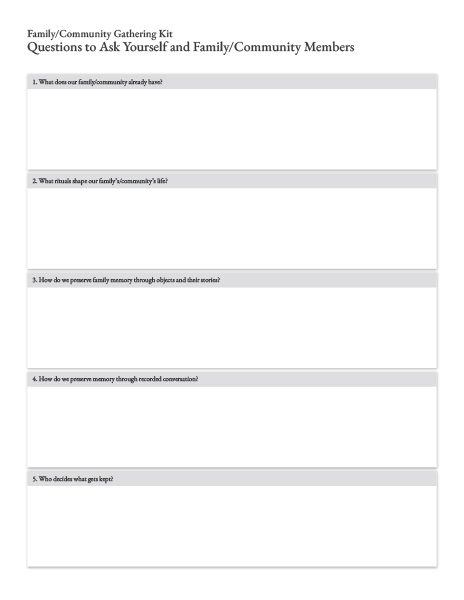
5. Questions to Ask Yourself and Family/Community Members

  1. What does our family/community already have?
  2. What rituals shape our family’s/community’s life?
  3. How do we preserve family memory through objects and their stories?
  4. How do we preserve memory through recorded conversation?
  5. Who decides what gets kept?

Download Printable Worksheet (PDF)

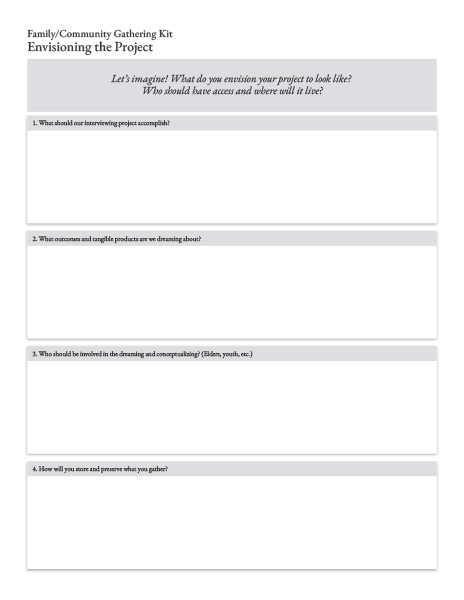
6. Envisioning the Project

Let’s imagine! What do you envision your project to look like? Who should have access and where will it live?

  1. What should our interviewing project accomplish?
  2. What outcomes and tangible products are we dreaming about?
  3. Who should be involved in the dreaming and conceptualizing? (elders, youth, etc.)
  4. How will you store and preserve what you gather?

Download Printable Worksheet (PDF)

7. Planning and Shaping Your Project

Before beginning a project, here are some things to get you started. What do you already have and what is needed?

  • The Why for an Interviewing Project
  • Network Mapping
    (Who can help/support? Who knows everyone, where are the photo albums, etc.)

    • Research
      (Set aside time to research your subject and develop questions)
  • Creating a Structure for the Project
    • Deliverables (What deliverables do you want to exist?)
    • Would a timeline for the project be helpful?
    • How many interviews would you like to do?
    • How long is each interview?
  • Finding Impactful Questions for the Interviews
    • Interview Process
      (Who are the people that you will interview? In-person/virtual?)
  • Preparing Interviewers and Inviting Interview Partners
    • Release forms/permissions and conditions of use
  • Technology for Recording and Keeping Track of It All Across Generations
    • What technology can be used across generations?