Metadata Toolkit for Zotero
Written By: Sayyara Huseynli, Shireen Zaineb
Welcome to the Metadata Toolkit for Zotero. The guide details the process of digitizing, organizing, describing, and preserving materials using a Zotero Group Library.
Welcome to the Metadata Toolkit for Zotero. The guide details the process of digitizing, organizing, describing, and preserving materials using a Zotero Group Library.
What is Digitization?
Digitization is the process of converting physical materials and objects into digital formats. It consists of several key steps, which include scanning or photographing a file, artifact, or document, creating metadata, and generating a long-term preservation plan. When it comes to archives and historical materials, digitization is beneficial for the preservation of organizational history, increased public access, and engagement of staff, patrons and other stakeholders. This guide addresses the second step of the digitization process, which is metadata creation.
What is Metadata?
Metadata is data that describes existing data, allowing for easier information retrieval by offering descriptive, structural, administrative, and preservation data for source materials. When digitizing collections, metadata is essential to the long-term sustainability, use, and findability of digitized materials. There are many tools that can be used for digitization and metadata creation, including Zotero. For guidance on getting started with Zotero, check out the Reckonings Project’s Zotero Guide.
Why use Metadata?
→ Ensure consistent record keeping
→ Preserve contextual and descriptive information about your digitized or born-digital materials
→ Access historical information in one place
→ Locate necessary information faster
Why Zotero?
Zotero is an open-source, free, and user-friendly tool, making personal archiving simple and accessible. As a desktop application, Zotero allows users to manually add files, metadata, citations, and links. Zotero also has a browser extension that enables users to save items to their collections directly from any browser with a click of a button. When saving an entry using the extension, Zotero automatically populates metadata. However, the accuracy of this process is not guaranteed, so always double-check the metadata after saving to your library.
The Group Library feature is one of our favorite functions in Zotero. It allows users to share their libraries with colleagues, collaborators, and other contributors, streamlining the co-creation process and centralizing collective data management To ensure that the diversity and creativity are reflected while maintaining consistency of data, we encourage using this guide.
This section guides users through the process of adding metadata to their digitized and/or digitally born files. Once an item has been added to a Zotero library, it’s time to populate the metadata fields. See Image 1.
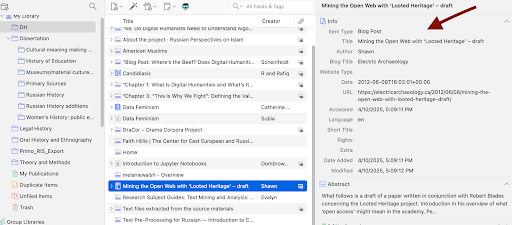
Use the following definitions to support consistency across items added to the document/archival collection in your Zotero Library:
Item Type: The format that an item exists in (e.g. Document, Interview, Map, Report).
Title: The exact title that appears in the item’s content. If an item has no clear title, add one that best describes the item’s content (e.g. mailing list of members, recommendation letters, and event calendar).
Author: The full name (Last, First) of the person, or full title of the non-person entity, that is responsible for the creation of the item.
Publisher: The title of the entity responsible for publishing the item (e.g. publication name, magazine title, host organization).
Date: The full date that the item was created in the format YYYY-MM-DD. If only the year is known, enter the year in the format YYYY.
Language: The language(s) used in the item.
Archive: The archive that an item is housed in, if applicable.
Loc. in Archive: Where an item is located in an archive (e.g. box, folder, file, and/or shelf number).
Call Number: The item’s call number in a library or archive.
Abstract: A summary of the record’s content.
Tag: Labels that support record findability and organization within a collection.
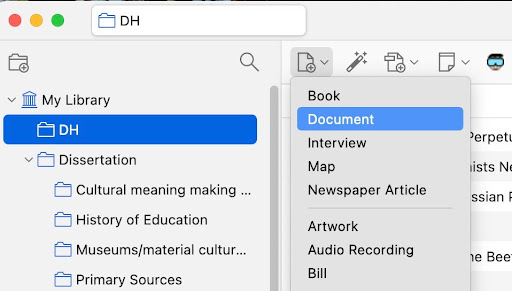
Let’s assume that most of your digitized materials are documents, in which case you will choose “Document” as your item type while adding a new file to the library or collection. In that case you will encounter the following Metadata fields:
Metadata fields for Document entries
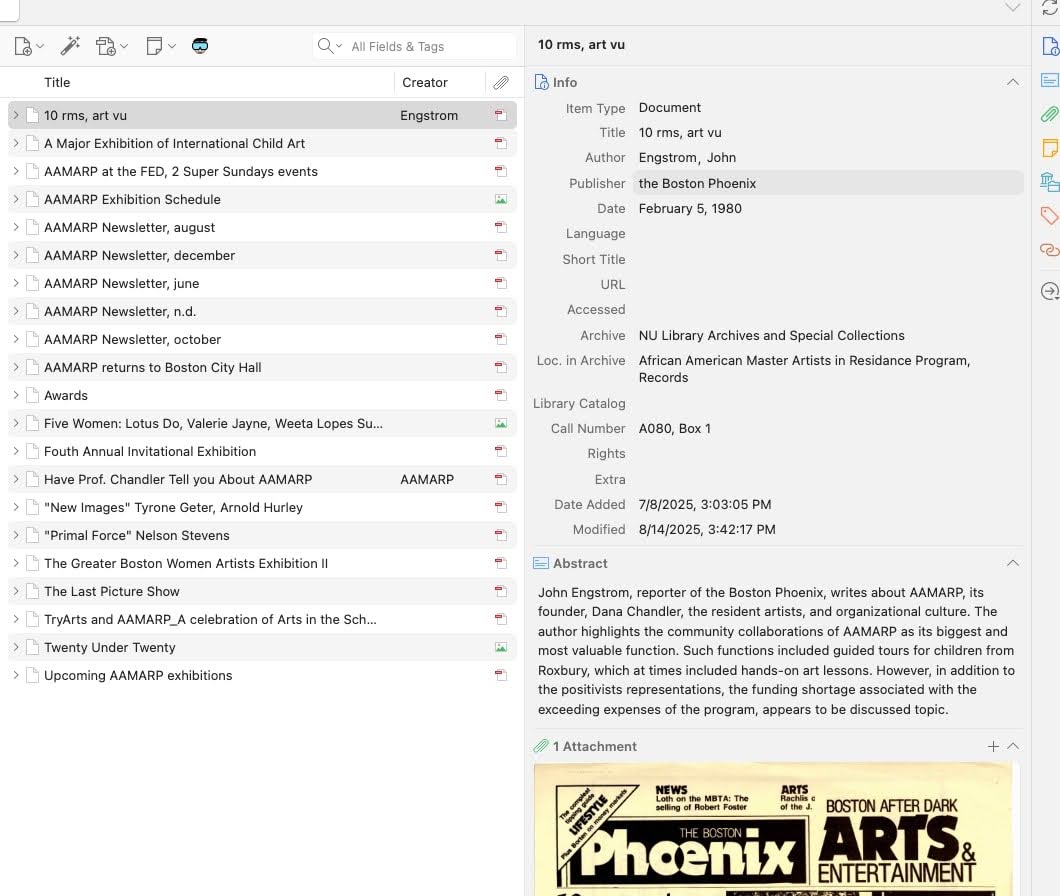
Abstract writing may seem redundant, as it features key elements of the document that have likely been already included in the previous fields. However, if the document/material contains several pages and different themes, the Abstract field can be utilized to capture the gist of information using 2-4 sentences.
Each item should include a short, 1-3 sentence description in the “Abstract” field. The description should detail what the item is and what its contents are. Include names of individuals, types of events, titles of the partner organizations, attendees and/or locations, if relevant to the project.
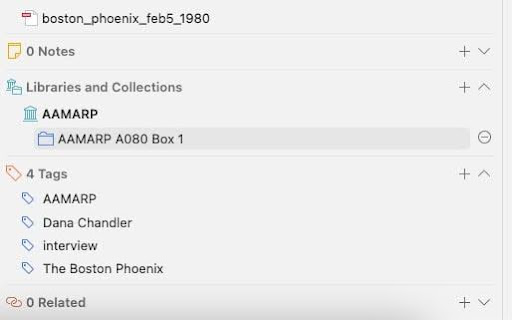
Tags are versatile labels that support findability, description, and categorization. These keywords can include topics, people, locations, item names, and/or other descriptors. In the desktop application, tags are located in the left lower section, which shows all tags inside the selected collection, and in the lower section of the metadata column, under the Abstract. The latter tags describe a single item. See Image 4.
Add at least one tag to each material in a collection, sourced directly from the primary source. In addition, the users can choose to include content-driven tags, which improve findability of the item. While making decisions about tags, we encourage you to consider the use of your material, audience, and the type of information that might meet the needs of your users. To ensure sustainability, we suggest creating a metadata spreadsheet. Establish this file as the place for the contributors to keep track of any changes, including the addition of new tags with rationale explaining the change.
Like any classification system, the creation and management of metadata is a process impacted by the personal bias of contributors and researchers, as well as users. In recent years, many traditional institutions like libraries, museums, universities, and archives, have made progress toward addressing the issue of bias. A seemingly simple replacement of “illegal” to “undocumented” reflects a shift of mindset and categorization of people, influenced by the people in that circumstance. When creating and editing metadata, it is crucial to turn to self-description when possible, consult communities represented in materials you are working with, and carefully examine one’s own biases.
Additional resources:
abejellinek, “Zotero Item Types and Fields”, Zotero, May 2025. https://www.zotero.org/support/kb/item_types_and_fields
dstillman, “Collection and tags”, Zotero, July, 2025. https://www.zotero.org/support/collection s_and_tags
Kim, Dorothy, and Stommel, Jesse. Disrupting the Digital Humanities. Punctum Books, 2018. 481-482.
“Metadata Guide”, Carnegie Mellon University Libraries, August 2025. https://guides.library.cmu.edu/Metadata